
Dyad Release Highlights
Checkout the rapidly developing capabilities of the most modern system simulation tool purpose built for AI and high performance computing.
Dyad 3.4: The Standalone Desktop App Has Arrived
Dyad 3.4 marks a major leap forward, making your modeling tools smoother, faster, and more powerful than ever. With Dyad Studio now shipping as an independent standalone desktop application, the entire platform arrives in a unified, ready-to-run environment—complete with a bundled Julia toolchain, native source control, and autonomous AI delegation—engineered to get you straight into modeling from day one.
Highlights at a Glance
A Dedicated Desktop Environment: Dyad Studio is now a fully standalone application with bundled Julia runtimes and built-in Git tooling—no external editors or marketplace extensions needed.
Autonomous AI Delegation: The Dyad AI Agent can now spawn parallel sub-agents to investigate codebases and execute edits in private workspace copies while your main thread stays open.
Claude Opus 5 by Default: While we’re evaluating Opus 5.5, all new agent conversations automatically leverage Anthropic's Claude Opus 5 model.
Direct Parameter File Binding: Connect external
TOMLparameter files directly to components and swap configurations with a single click.Vectorized Math & Compilation Control: Express array mathematics with native Julia-style dot operators (
.+,.*), and dial in exact compilation vs. runtime trade-offs with granular specialization levels.
Dyad 3.4: The Standalone Desktop App Has Arrived
Dyad 3.4 marks a major leap forward, making your modeling tools smoother, faster, and more powerful than ever. With Dyad Studio now shipping as an independent standalone desktop application, the entire platform arrives in a unified, ready-to-run environment—complete with a bundled Julia toolchain, native source control, and autonomous AI delegation—engineered to get you straight into modeling from day one.
Highlights at a Glance
A Dedicated Desktop Environment: Dyad Studio is now a fully standalone application with bundled Julia runtimes and built-in Git tooling—no external editors or marketplace extensions needed.
Autonomous AI Delegation: The Dyad AI Agent can now spawn parallel sub-agents to investigate codebases and execute edits in private workspace copies while your main thread stays open.
Claude Opus 5 by Default: While we’re evaluating Opus 5.5, all new agent conversations automatically leverage Anthropic's Claude Opus 5 model.
Direct Parameter File Binding: Connect external
TOMLparameter files directly to components and swap configurations with a single click.Vectorized Math & Compilation Control: Express array mathematics with native Julia-style dot operators (
.+,.*), and dial in exact compilation vs. runtime trade-offs with granular specialization levels.
Dyad 3.4: The Standalone Desktop App Has Arrived
Dyad 3.4 marks a major leap forward, making your modeling tools smoother, faster, and more powerful than ever. With Dyad Studio now shipping as an independent standalone desktop application, the entire platform arrives in a unified, ready-to-run environment—complete with a bundled Julia toolchain, native source control, and autonomous AI delegation—engineered to get you straight into modeling from day one.
Highlights at a Glance
A Dedicated Desktop Environment: Dyad Studio is now a fully standalone application with bundled Julia runtimes and built-in Git tooling—no external editors or marketplace extensions needed.
Autonomous AI Delegation: The Dyad AI Agent can now spawn parallel sub-agents to investigate codebases and execute edits in private workspace copies while your main thread stays open.
Claude Opus 5 by Default: While we’re evaluating Opus 5.5, all new agent conversations automatically leverage Anthropic's Claude Opus 5 model.
Direct Parameter File Binding: Connect external
TOMLparameter files directly to components and swap configurations with a single click.Vectorized Math & Compilation Control: Express array mathematics with native Julia-style dot operators (
.+,.*), and dial in exact compilation vs. runtime trade-offs with granular specialization levels.
The Standalone Studio Experience
Dyad Studio 3.4 brings our complete visual and computational modeling workspace into its own purpose-built desktop app.
By bundling the Julia toolchain natively within the installer, Dyad Studio is ready for immediate action out of the box. Everything you need to assemble, simulate, and analyze complex systems is integrated into a unified desktop frame. Source control is baked directly into the workbench: a dedicated Git panel lets you stage diffs, commit changes, and inspect revision histories without context-switching to an external terminal or editor. It delivers the full power of the Dyad ecosystem in a focused, zero-setup package.
The Standalone Studio Experience
Dyad Studio 3.4 brings our complete visual and computational modeling workspace into its own purpose-built desktop app.
By bundling the Julia toolchain natively within the installer, Dyad Studio is ready for immediate action out of the box. Everything you need to assemble, simulate, and analyze complex systems is integrated into a unified desktop frame. Source control is baked directly into the workbench: a dedicated Git panel lets you stage diffs, commit changes, and inspect revision histories without context-switching to an external terminal or editor. It delivers the full power of the Dyad ecosystem in a focused, zero-setup package.
The Standalone Studio Experience
Dyad Studio 3.4 brings our complete visual and computational modeling workspace into its own purpose-built desktop app.
By bundling the Julia toolchain natively within the installer, Dyad Studio is ready for immediate action out of the box. Everything you need to assemble, simulate, and analyze complex systems is integrated into a unified desktop frame. Source control is baked directly into the workbench: a dedicated Git panel lets you stage diffs, commit changes, and inspect revision histories without context-switching to an external terminal or editor. It delivers the full power of the Dyad ecosystem in a focused, zero-setup package.
A True Multi-Agent Workflow: Autonomous Sub-Agent Delegation
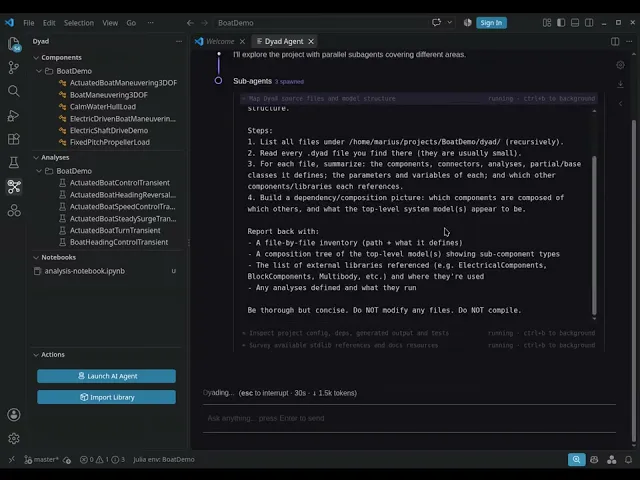
The headline upgrade in the Dyad AI Agent is the transition from a linear, single-threaded chat assistant into a collaborative multi-agent system. In previous versions, handing the agent a large exploration or refactoring task meant waiting on hold while it processed. In 3.4, the agent intelligently decomposes complex requests into concurrent sub-tasks.
Parallel Investigations Without Blocking
When you ask the agent to explore an unfamiliar subsystem or search across project libraries, it spins up lightweight, read-only sub-agents. These sub-agents query files, trace connections, and synthesize findings in parallel—leaving your primary chat window entirely unblocked so you can keep asking questions or inspecting schematics.
Safe Edits in Isolated Workspace Copies
When code modifications are on the table, the agent dispatches an editing sub-agent into an isolated, private copy of your project. Your working files remain untouched while the sub-agent drafts, tests, and validates the changes. Once the run finishes, the primary agent receives the path to the copy and the list of modified files, then decides what to bring across into your project.
Even better, these project copies persist across app restarts. You can close Dyad Studio, reopen it tomorrow, and the agent picks right back up with complete awareness of where the private copy lives and what changed.
A True Multi-Agent Workflow: Autonomous Sub-Agent Delegation
The headline upgrade in the Dyad AI Agent is the transition from a linear, single-threaded chat assistant into a collaborative multi-agent system. In previous versions, handing the agent a large exploration or refactoring task meant waiting on hold while it processed. In 3.4, the agent intelligently decomposes complex requests into concurrent sub-tasks.
Parallel Investigations Without Blocking
When you ask the agent to explore an unfamiliar subsystem or search across project libraries, it spins up lightweight, read-only sub-agents. These sub-agents query files, trace connections, and synthesize findings in parallel—leaving your primary chat window entirely unblocked so you can keep asking questions or inspecting schematics.
Safe Edits in Isolated Workspace Copies
When code modifications are on the table, the agent dispatches an editing sub-agent into an isolated, private copy of your project. Your working files remain untouched while the sub-agent drafts, tests, and validates the changes. Once the run finishes, the primary agent receives the path to the copy and the list of modified files, then decides what to bring across into your project.
Even better, these project copies persist across app restarts. You can close Dyad Studio, reopen it tomorrow, and the agent picks right back up with complete awareness of where the private copy lives and what changed.
A True Multi-Agent Workflow: Autonomous Sub-Agent Delegation
The headline upgrade in the Dyad AI Agent is the transition from a linear, single-threaded chat assistant into a collaborative multi-agent system. In previous versions, handing the agent a large exploration or refactoring task meant waiting on hold while it processed. In 3.4, the agent intelligently decomposes complex requests into concurrent sub-tasks.
Parallel Investigations Without Blocking
When you ask the agent to explore an unfamiliar subsystem or search across project libraries, it spins up lightweight, read-only sub-agents. These sub-agents query files, trace connections, and synthesize findings in parallel—leaving your primary chat window entirely unblocked so you can keep asking questions or inspecting schematics.
Safe Edits in Isolated Workspace Copies
When code modifications are on the table, the agent dispatches an editing sub-agent into an isolated, private copy of your project. Your working files remain untouched while the sub-agent drafts, tests, and validates the changes. Once the run finishes, the primary agent receives the path to the copy and the list of modified files, then decides what to bring across into your project.
Even better, these project copies persist across app restarts. You can close Dyad Studio, reopen it tomorrow, and the agent picks right back up with complete awareness of where the private copy lives and what changed.
Swapping Parameter Scenarios on the Fly
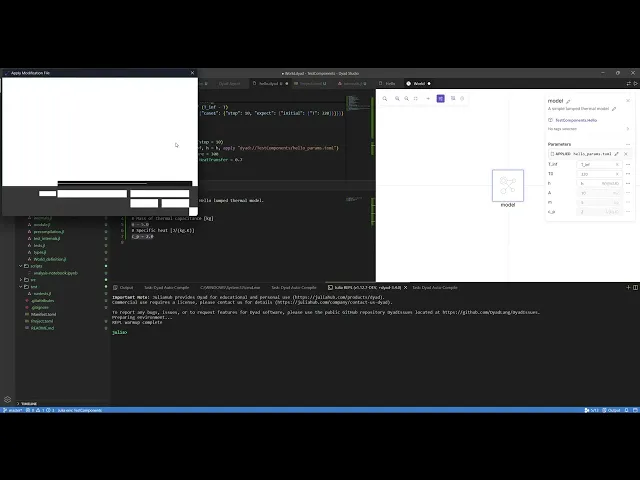
Managing multi-condition operational baselines is now frictionless. You can link external parameter files (.toml with json and csv support coming soon) from your project assets directly to a component by reference. Swapping from a nominal baseline to an extreme-temperature scenario is as simple as clicking the pencil icon on the component's parameter row and choosing the new file.
Swapping Parameter Scenarios on the Fly
Managing multi-condition operational baselines is now frictionless. You can link external parameter files (.toml with json and csv support coming soon) from your project assets directly to a component by reference. Swapping from a nominal baseline to an extreme-temperature scenario is as simple as clicking the pencil icon on the component's parameter row and choosing the new file.
Swapping Parameter Scenarios on the Fly
Managing multi-condition operational baselines is now frictionless. You can link external parameter files (.toml with json and csv support coming soon) from your project assets directly to a component by reference. Swapping from a nominal baseline to an extreme-temperature scenario is as simple as clicking the pencil icon on the component's parameter row and choosing the new file.
Cleaner Canvas Navigation and Visuals
Day-to-day modeling on the Studio canvas also gets a major boost in ergonomics, focusing on speed, visual clarity, and layout precision.
Keyboard Flip & Rotate: Orienting parts on the canvas no longer requires digging through right-click menus—simply select any component and adjust its rotation or flip directly from the keyboard.
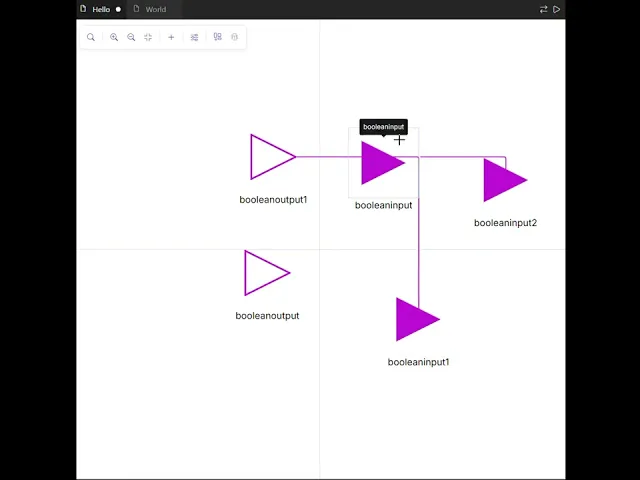
Junctions vs. Line Crossings: In dense schematics, deciphering overlapping signals can get tricky. Dyad 3.4 clearly visually differentiates line crossings from true physical or electrical junctions at a glance.
Cleaner Canvas Navigation and Visuals
Day-to-day modeling on the Studio canvas also gets a major boost in ergonomics, focusing on speed, visual clarity, and layout precision.
Keyboard Flip & Rotate: Orienting parts on the canvas no longer requires digging through right-click menus—simply select any component and adjust its rotation or flip directly from the keyboard.
Junctions vs. Line Crossings: In dense schematics, deciphering overlapping signals can get tricky. Dyad 3.4 clearly visually differentiates line crossings from true physical or electrical junctions at a glance.
Cleaner Canvas Navigation and Visuals
Day-to-day modeling on the Studio canvas also gets a major boost in ergonomics, focusing on speed, visual clarity, and layout precision.
Keyboard Flip & Rotate: Orienting parts on the canvas no longer requires digging through right-click menus—simply select any component and adjust its rotation or flip directly from the keyboard.
Junctions vs. Line Crossings: In dense schematics, deciphering overlapping signals can get tricky. Dyad 3.4 clearly visually differentiates line crossings from true physical or electrical junctions at a glance.
Language Upgrades: Julia-Style Vector Math & Dynamic Specialization
1. Element-Wise Vectorized Math
You can now write vectorized, array-valued expressions using standard dot-prefixed arithmetic operators—matching the familiar, expressive syntax of Julia:
# Express array-level physics with intuitive element-wise operators
# Supports unary operators in prefix position (.- and .+)
y = .-a .* x .^ 2 .+ b .* x .+ c
Full support is included for:
Binary operators:
.+,.-,.*,./,.%, and.^Unary operators in prefix position:
.+and.-(for instance,.-xto negate array elements element-wise)
Existing model libraries remain 100% backward compatible without any syntax changes required.
2. Tailored Analysis Specialization
Simulation workflows have different needs at different stages: early design requires rapid iteration, while final verification demands maximum simulation throughput. Dyad 3.4 lets you specify the specialization parameter across transient and steady-state analyses:
Despecialize(Default): Drastically cuts compilation overhead so you can make quick changes and test model logic in seconds. (Currently delivers its compilation latency reductions to transient analyses).AutoSpecialize: A balanced mid-tier optimization profile suitable for routine test sweeps.FullSpecialize: Employs full compiler optimizations to maximize runtime speed for heavy, long-running simulations.
3. Inheritance Specialization with apply
You can now apply specialization configurations directly inside an extends clause using apply. Instead of re-declaring specialized settings across every derived child component, you can enforce specialization right at the point of inheritance:
# Enforce specialization cleanly at the point of inheritance
component SpecializedInverter extends StandardInverter apply(specialization = FullSpecialize)
Language Upgrades: Julia-Style Vector Math & Dynamic Specialization
1. Element-Wise Vectorized Math
You can now write vectorized, array-valued expressions using standard dot-prefixed arithmetic operators—matching the familiar, expressive syntax of Julia:
# Express array-level physics with intuitive element-wise operators
# Supports unary operators in prefix position (.- and .+)
y = .-a .* x .^ 2 .+ b .* x .+ c
Full support is included for:
Binary operators:
.+,.-,.*,./,.%, and.^Unary operators in prefix position:
.+and.-(for instance,.-xto negate array elements element-wise)
Existing model libraries remain 100% backward compatible without any syntax changes required.
2. Tailored Analysis Specialization
Simulation workflows have different needs at different stages: early design requires rapid iteration, while final verification demands maximum simulation throughput. Dyad 3.4 lets you specify the specialization parameter across transient and steady-state analyses:
Despecialize(Default): Drastically cuts compilation overhead so you can make quick changes and test model logic in seconds. (Currently delivers its compilation latency reductions to transient analyses).AutoSpecialize: A balanced mid-tier optimization profile suitable for routine test sweeps.FullSpecialize: Employs full compiler optimizations to maximize runtime speed for heavy, long-running simulations.
3. Inheritance Specialization with apply
You can now apply specialization configurations directly inside an extends clause using apply. Instead of re-declaring specialized settings across every derived child component, you can enforce specialization right at the point of inheritance:
# Enforce specialization cleanly at the point of inheritance
component SpecializedInverter extends StandardInverter apply(specialization = FullSpecialize)
Language Upgrades: Julia-Style Vector Math & Dynamic Specialization
1. Element-Wise Vectorized Math
You can now write vectorized, array-valued expressions using standard dot-prefixed arithmetic operators—matching the familiar, expressive syntax of Julia:
# Express array-level physics with intuitive element-wise operators
# Supports unary operators in prefix position (.- and .+)
y = .-a .* x .^ 2 .+ b .* x .+ c
Full support is included for:
Binary operators:
.+,.-,.*,./,.%, and.^Unary operators in prefix position:
.+and.-(for instance,.-xto negate array elements element-wise)
Existing model libraries remain 100% backward compatible without any syntax changes required.
2. Tailored Analysis Specialization
Simulation workflows have different needs at different stages: early design requires rapid iteration, while final verification demands maximum simulation throughput. Dyad 3.4 lets you specify the specialization parameter across transient and steady-state analyses:
Despecialize(Default): Drastically cuts compilation overhead so you can make quick changes and test model logic in seconds. (Currently delivers its compilation latency reductions to transient analyses).AutoSpecialize: A balanced mid-tier optimization profile suitable for routine test sweeps.FullSpecialize: Employs full compiler optimizations to maximize runtime speed for heavy, long-running simulations.
3. Inheritance Specialization with apply
You can now apply specialization configurations directly inside an extends clause using apply. Instead of re-declaring specialized settings across every derived child component, you can enforce specialization right at the point of inheritance:
# Enforce specialization cleanly at the point of inheritance
component SpecializedInverter extends StandardInverter apply(specialization = FullSpecialize)
Getting Started with 3.4
Dyad 3.4 is available to download today from the installation page.
For existing projects, upgrading is effortless: opening your workspace in 3.4 prompts a one-click migration that updates and pins the latest library versions across the entire component suite—including mechanical, electrical, thermal, and fluid domains, as well as the newly updated DyadModelOptimizer v15.4.0.
Dyad 3.4 brings us closer to a truly unified, AI-native systems engineering platform designed to work alongside you. Download the desktop build, fire up a multi-agent workflow, and see what you can build.
For full release notes, see the Dyad release notes.
Happy modeling!
Getting Started with 3.4
Dyad 3.4 is available to download today from the installation page.
For existing projects, upgrading is effortless: opening your workspace in 3.4 prompts a one-click migration that updates and pins the latest library versions across the entire component suite—including mechanical, electrical, thermal, and fluid domains, as well as the newly updated DyadModelOptimizer v15.4.0.
Dyad 3.4 brings us closer to a truly unified, AI-native systems engineering platform designed to work alongside you. Download the desktop build, fire up a multi-agent workflow, and see what you can build.
For full release notes, see the Dyad release notes.
Happy modeling!
Getting Started with 3.4
Dyad 3.4 is available to download today from the installation page.
For existing projects, upgrading is effortless: opening your workspace in 3.4 prompts a one-click migration that updates and pins the latest library versions across the entire component suite—including mechanical, electrical, thermal, and fluid domains, as well as the newly updated DyadModelOptimizer v15.4.0.
Dyad 3.4 brings us closer to a truly unified, AI-native systems engineering platform designed to work alongside you. Download the desktop build, fire up a multi-agent workflow, and see what you can build.
For full release notes, see the Dyad release notes.
Happy modeling!
Contact Sales
Learn about Dyad, pricing, implementation, and how we can help your business
We’ll use your information to respond to your inquiry and, if applicable, classify your interest for relevant follow-up regarding our products. If you'd like to receive our newsletter and product updates, please check the box above. You can unsubscribe at any time. Learn more in our Privacy Policy.
Get a Demo
Discover how Dyad and JuliaHub can improve your modeling and simulation workflows.
Enterprise Support
Leverage our developers, engineers and data scientists to help you build new solutions.
Custom Solutions
Have a complex setup that needs a custom solution? We are here to help.
Contact Sales
Learn about Dyad, pricing, implementation, and how we can help your business
We’ll use your information to respond to your inquiry and, if applicable, classify your interest for relevant follow-up regarding our products. If you'd like to receive our newsletter and product updates, please check the box above. You can unsubscribe at any time. Learn more in our Privacy Policy.
Get a Demo
Discover how Dyad and JuliaHub can improve your modeling and simulation workflows.
Enterprise Support
Leverage our developers, engineers and data scientists to help you build new solutions.
Custom Solutions
Have a complex setup that needs a custom solution? We are here to help.