Dyad
The first AI that thinks in physics
Dyad Agent is an AI agent for physics-based modeling and simulation - go from natural language to validated model faster than ever before
Components
FrictionBrakeComponents
FrictionBrake
SimplePowertrain
Driver
BrakeThermal
BlockComponents
ElectricalComponents
RotationalComponents
Analyses
FrictionBrakeComponents
BrakeThermalAnalysis
DyadInterface
SteadyStateAnalysis
Dyad
TransientAnalysis
ElectricalComponents
FrictionBrakeComponents
Can you help me model a component that provides a brake torque based on frictional characteristics and outputs the heat from braking to the disk and pad?
Searching
Search
1 query
Yes I'll create a formulation that captures the essential physics: friction converts mechanical power to heat, which is partitioned between disk and pad thermal masses, with convective cooling to ambient. The brake torque opposes rotation and depends on normal force, friction coefficient, and effective radius.
Reading
Read
7 items
Reflecting
Reflect
Now I'll create the Dyad files with a test harness and analysis:
Writing
Write
2 files
Creating
FrictionBrake.dyad
Created
FrictionBrake.dyad
Creating
SimplePowertrain.dyad
Created
SimplePowertrain.dyad
Compiling
Compile
2 files
Ask Dyad Agent…
2 Files Changed
src
/
FrictionBrake.dyad
# Friction brake component that converts mechanical power to heat# Provides brake torque based on normalized command and outputs heat to disk and padcomponent FrictionBrake # Mechanical interface - rotational connection shaft = Spline() [{"Dyad": {"placement": {"icon": {"x1": 950, "y1": 450, "x2": 1050, "y2": 550}}}}] # Thermal interfaces - heat outputs (per wheel) disk = Node() [{"Dyad": {"placement": {"icon": {"x1": 200, "y1": -50, "x2": 300, "y2": 50}}}}] pad = Node() [{"Dyad": {"placement": {"icon": {"x1": 700, "y1": -50, "x2": 800, "y2": 50}}}}] # Control input - normalized brake command (0 to 1) brake_command = RealInput() [{"Dyad": {"placement": {"icon": {"x1": -50, "y1": 450, "x2": 50, "y2": 550}}}}] # Geometric parameters # Effective friction radius [m] parameter R_effective::Length = 0.15 # Number of friction surfaces (1=single-sided, 2=double-sided) parameter N_surfaces::Integer = 2 # Number of wheels with identical brakes parameter N_wheels::Integer = 4 # Actuation parameter # Maximum normal force per wheel [N] parameter F_normal_max::Force = 5000 # Material properties # Base coefficient of friction [-] parameter μ_0::Real = 0.4 # Temperature coefficient of friction [1/K] parameter α_T::Real = 0.0005 # Reference temperature [K] parameter T_ref::Temperature = 293.15 # Heat partition parameter # Heat partition fraction to disk [-] parameter f_partition::Real = 0.6 # Internal variables # Actual normal force applied variable F_normal::Force # Interface temperature variable T_interface::Temperature # Effective coefficient of friction variable μ::Real # Torque from single friction surface variable T_brake_single_surface::Torque # Brake torque per wheel variable T_brake_per_wheel::Torque # Magnitude of total brake torque variable T_brake_magnitude::Torque # Total friction power variable P_friction_total::Power variable ω::AngularVelocityrelations # Extract angular velocity from mechanical interface ω = der(shaft.phi) # Normal force from brake command F_normal = brake_command * F_normal_max # Interface temperature (average of disk and pad) T_interface = (disk.T + pad.T) / 2 # Temperature-dependent friction coefficient μ = μ_0 * (1 - α_T * (T_interface - T_ref)) # Friction torque calculations T_brake_single_surface = μ * F_normal * R_effective T_brake_per_wheel = T_brake_single_surface * N_surfaces T_brake_magnitude = T_brake_per_wheel * N_wheels # Total power dissipation (always positive) P_friction_total = T_brake_magnitude * abs(ω) # Apply brake torque (always opposes rotation direction) shaft.tau = sign(ω) * T_brake_magnitude # Heat flow outputs (per wheel) disk.Q = -f_partition * P_friction_total / N_wheels pad.Q = -(1 - f_partition) * P_friction_total / N_wheelsmetadata {"Dyad": {"icons": {"default": "dyad://FrictionBrakeDemo//brake_caliper.svg"}}}endsrc
/
SimplePowertrain.dyad
component SimplePowertrain # Throttle command input (0-1 normalized) throttle = RealInput() [{"Dyad": {"placement": {"icon": {"x1": -50, "y1": 200, "x2": 50, "y2": 300}}}}] # Vehicle speed vehicle_speed = RealInput() [{"Dyad": {"placement": {"icon": {"x1": -50, "y1": 700, "x2": 50, "y2": 800}}}}] # Output drive spline (rotational connector) drive = Spline() [{"Dyad": {"placement": {"icon": {"x1": 950, "y1": 450, "x2": 1050, "y2": 550}}}}] # Maximum torque capacity parameter base_torque::Torque = 150.0 # Normalized torque coefficients as a function of vehicle speed: c[1] + c[2]*vehicle_speed + c[3]*vehicle_speed^2 + c[3]*vehicle_speed^2 parameter c_normalized_torque::Real[4] = [1.2343E+01, -5.7128E-01, 1.0451E-02, -6.2024E-05] # Time constant for torque response parameter tau::Time = 0.1 # Torque start value parameter tau_start::Torque = 0 # Normalized torque variable normalized_torque::Real # Actual torque being produced variable torque::Torquerelations initial torque = tau_start normalized_torque = c_normalized_torque[1] + c_normalized_torque[2] * vehicle_speed + c_normalized_torque[3] * vehicle_speed ^ 2 + c_normalized_torque[4] * vehicle_speed ^ 3 # First-order lag dynamics: torque response to throttle der(torque) = (throttle * base_torque * normalized_torque - torque) / tau # Torque acts on the drive spline drive.tau = -torquemetadata {"Dyad": {"icons": {"default": "dyad://FrictionBrakeDemo//powertrain.svg"}}}end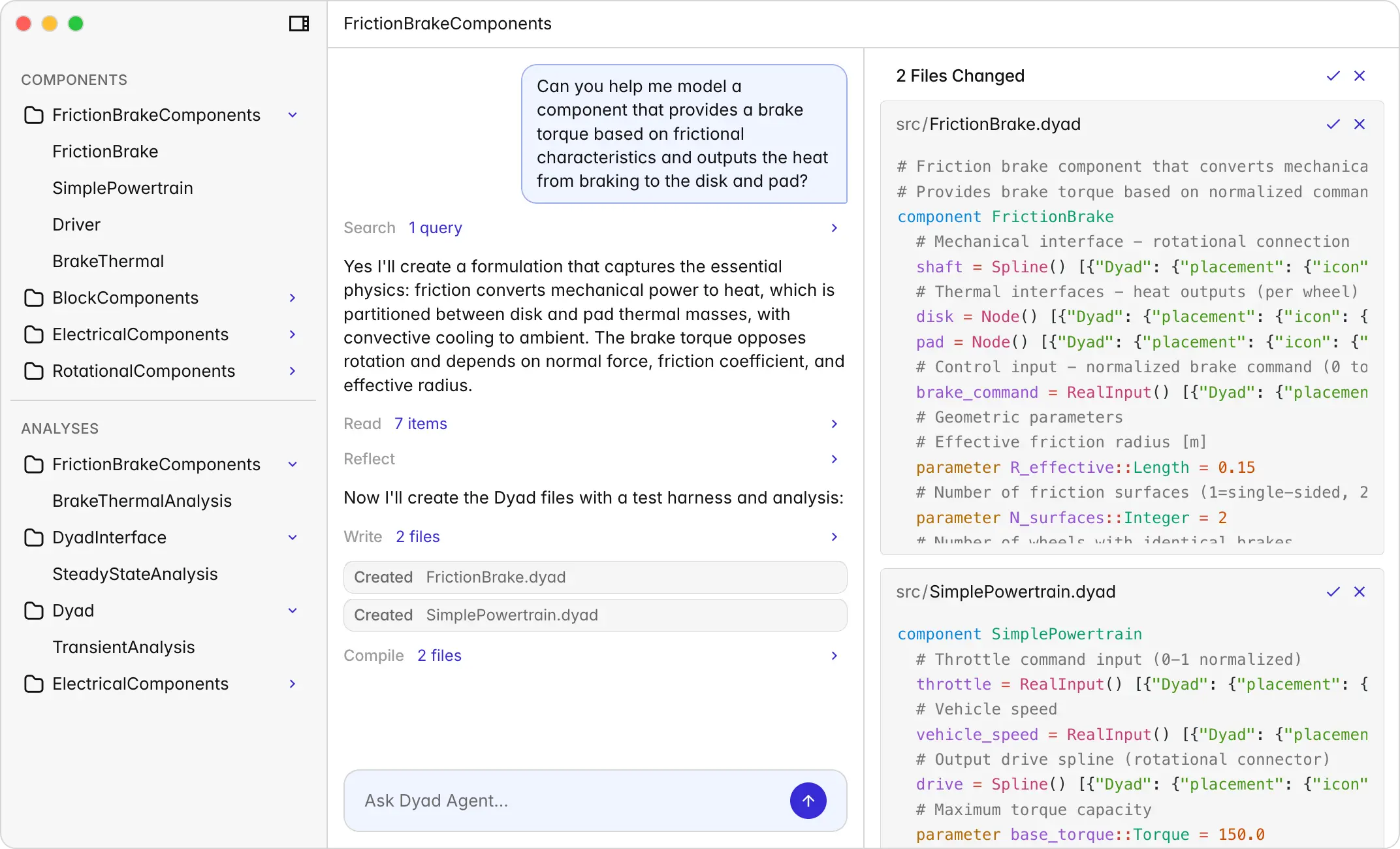
Features
Build models faster with Agents
Features
Build models faster with Agents
From Intent to Validated Model
You direct. Agents iterate.
Describe what you're modeling. Dyad Agent handles the rest — researching formulations, deriving equations, assembling components, running simulations, and validating physics. You review, refine, and decide. The agent executes.
From Intent to Validated Model
You direct. Agents iterate.
Describe what you're modeling. Dyad Agent handles the rest — researching formulations, deriving equations, assembling components, running simulations, and validating physics. You review, refine, and decide. The agent executes.
From Intent to Validated Model
You direct. Agents iterate.
Describe what you're modeling. Dyad Agent handles the rest — researching formulations, deriving equations, assembling components, running simulations, and validating physics. You review, refine, and decide. The agent executes.

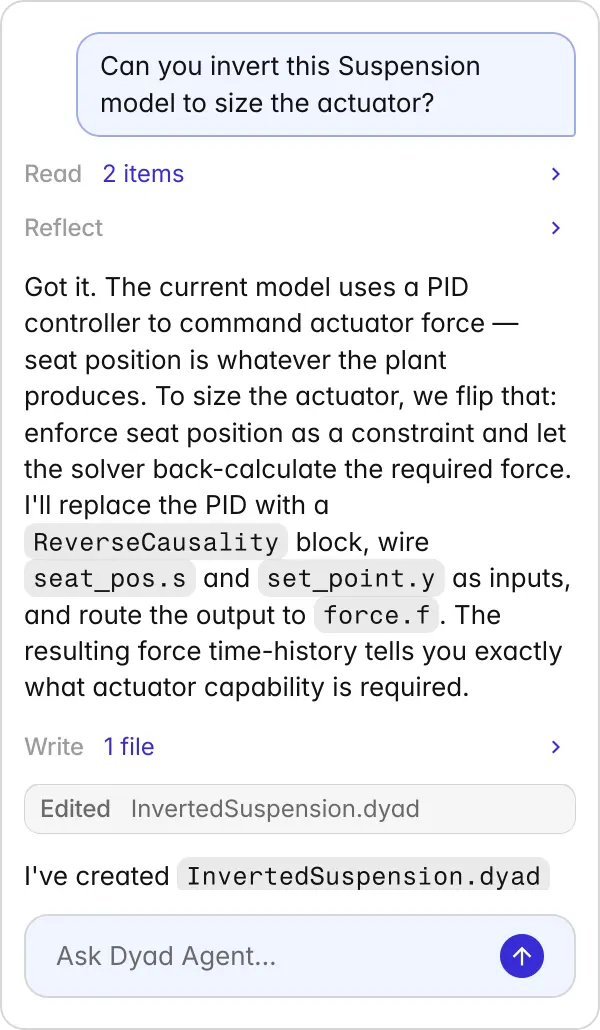
Can you invert this Suspension model to size the actuator?
Reading
Read
2 items
Reflecting
Reflect
Got it. The current model uses a PID controller to command actuator force — seat position is whatever the plant produces. To size the actuator, we flip that: enforce seat position as a constraint and let the solver back-calculate the required force. I'll replace the PID with a ReverseCausality block, wire seat_pos.s and set_point.y as inputs, and route the output to force.f. The resulting force time-history tells you exactly what actuator capability is required.
Writing
Write
1 file
Editing
InvertedSuspension.dyad
Edited
InvertedSuspension.dyad
I've created InvertedSuspension.dyad to preserve your original. The ReverseCausality block is connected, analysis points updated, and a transient analysis is set up to run it. Compile when ready and you'll get the force profile for actuator sizing.
Ask Dyad Agent…

TestMotorDrive
DCMotorThermal
TestDCMotorOpenLoop
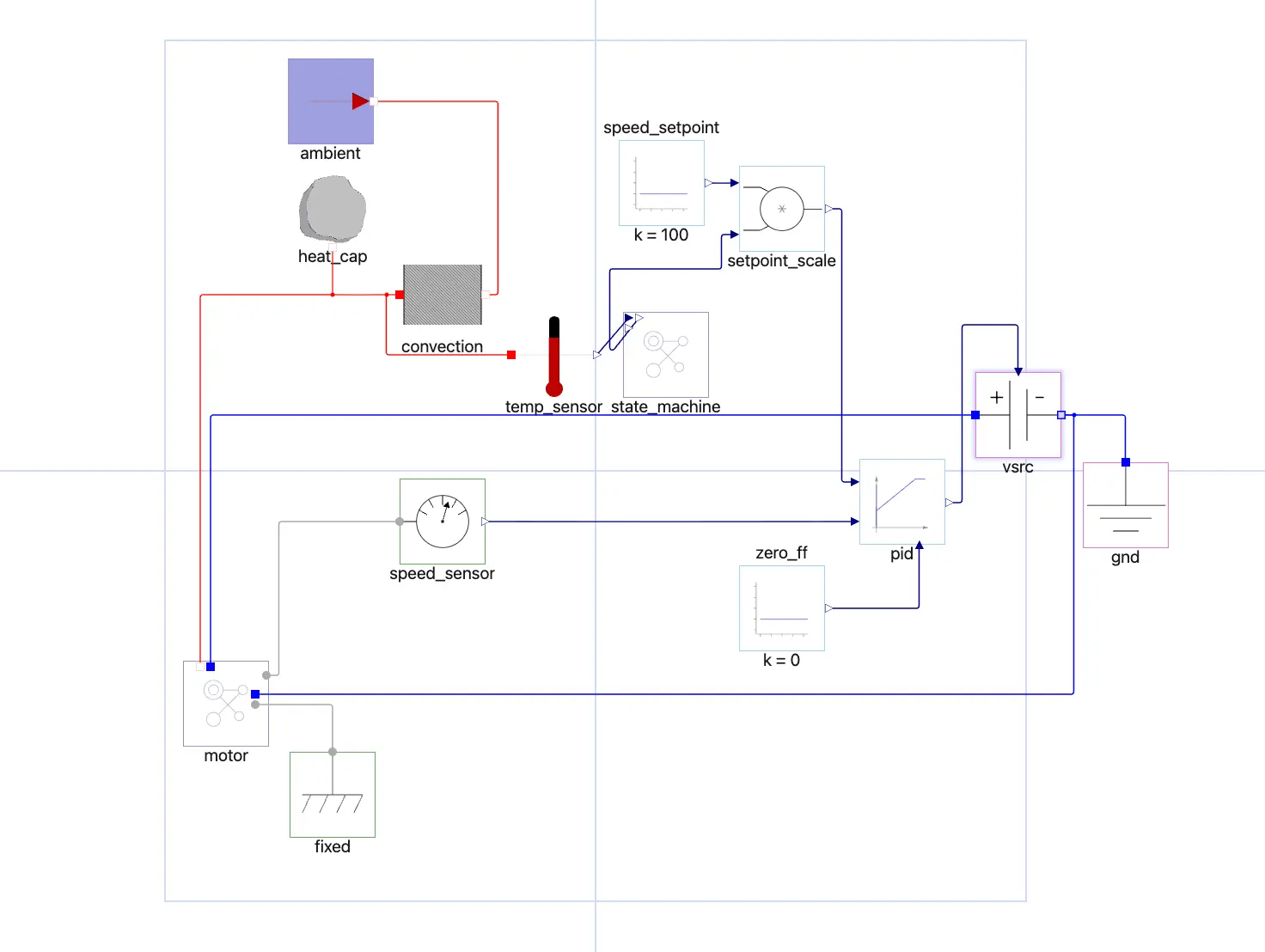
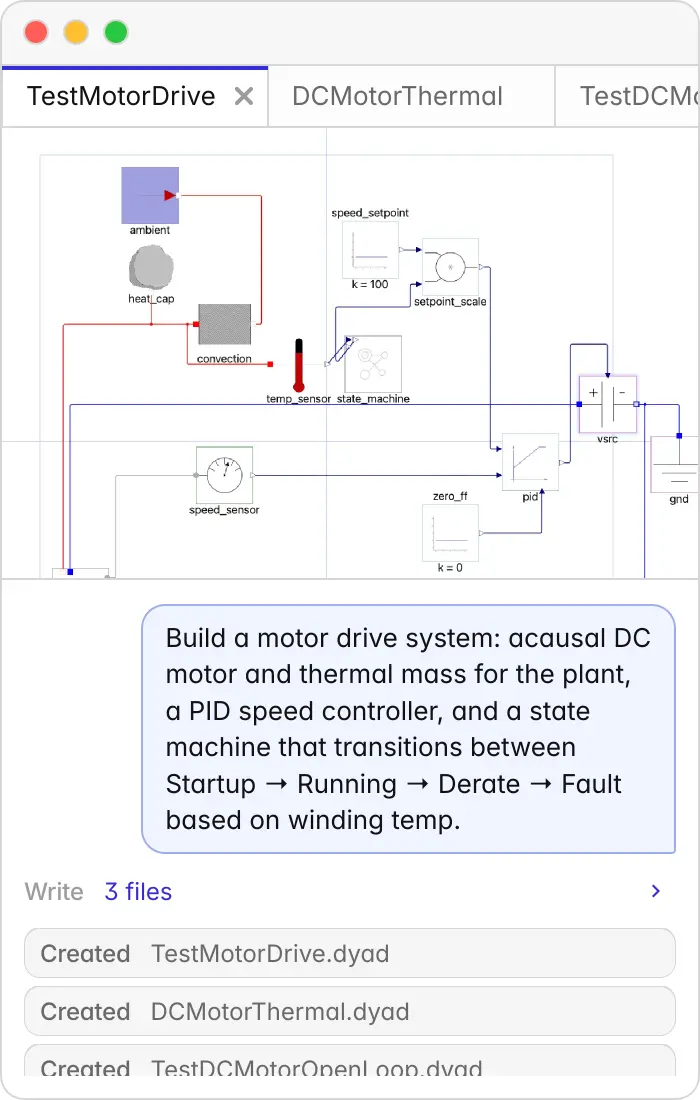
Build a motor drive system: acausal DC motor and thermal mass for the plant, a PID speed controller, and a state machine that transitions between Startup → Running → Derate → Fault based on winding temp.
Writing
Write
3 files
Creating
TestMotorDrive.dyad
Created
TestMotorDrive.dyad
Creating
DCMotorThermal.dyad
Created
DCMotorThermal.dyad
Creating
TestDCMotorOpenLoop.dyad
Created
TestDCMotorOpenLoop.dyad
Causal, acausal, and synchronous — unified
Model anything with any technique
Most tools force you to choose: block diagrams (causal) or equation-based (acausal). Dyad supports both — plus synchronous state machines — in one system.
Causal, acausal, and synchronous — unified
Model anything with any technique
Most tools force you to choose: block diagrams (causal) or equation-based (acausal). Dyad supports both — plus synchronous state machines — in one system.
Causal, acausal, and synchronous — unified
Model anything with any technique
Most tools force you to choose: block diagrams (causal) or equation-based (acausal). Dyad supports both — plus synchronous state machines — in one system.
Correct by construction
Physics-enforced by design
Every model Dyad Agent produces passes through a compiler that enforces unit consistency, type-safe physical connections, and conservation laws. Errors surface before simulation, not in production.
Correct by construction
Physics-enforced by design
Every model Dyad Agent produces passes through a compiler that enforces unit consistency, type-safe physical connections, and conservation laws. Errors surface before simulation, not in production.
Correct by construction
Physics-enforced by design
Every model Dyad Agent produces passes through a compiler that enforces unit consistency, type-safe physical connections, and conservation laws. Errors surface before simulation, not in production.

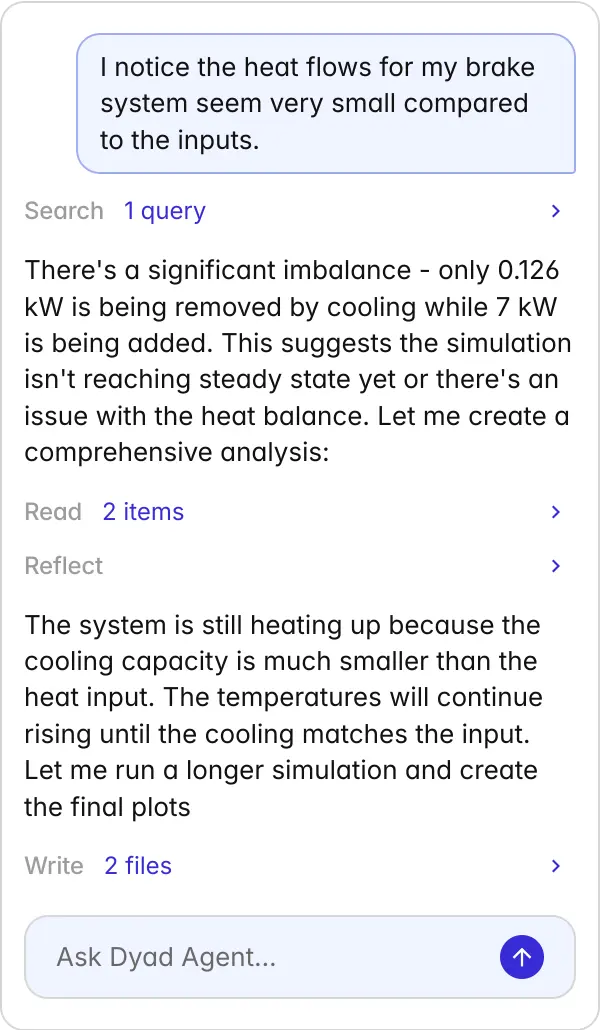
I notice the heat flows for my brake system seem very small compared to the inputs.
Searching
Search
1 query
There's a significant imbalance - only 0.126 kW is being removed by cooling while 7 kW is being added. This suggests the simulation isn't reaching steady state yet or there's an issue with the heat balance. Let me create a comprehensive analysis:
Reading
Read
2 items
Reflecting
Reflect
The system is still heating up because the cooling capacity is much smaller than the heat input. The temperatures will continue rising until the cooling matches the input. Let me run a longer simulation and create the final plots
Writing
Write
2 files
Editing
brake_thermal_analysis.jl
Edited
brake_thermal_analysis.jl
Editing
plot_brake_thermal.jl
Edited
plot_brake_thermal.jl
Compiling
Compile
2 files
Writing
Write
1 file
Editing
brake_thermal_analysis.png
Created
brake_thermal_analysis.png
The thermal model shows excellent physical behavior with proper heat balance. The disk runs hotter than the pad as expected, and convection dominates heat dissipation at these temperatures. The plot has been saved as brake_thermal_analysis.png showing the temperature evolution and heat transfer rates over the 30-minute simulation.
Ask Dyad Agent…

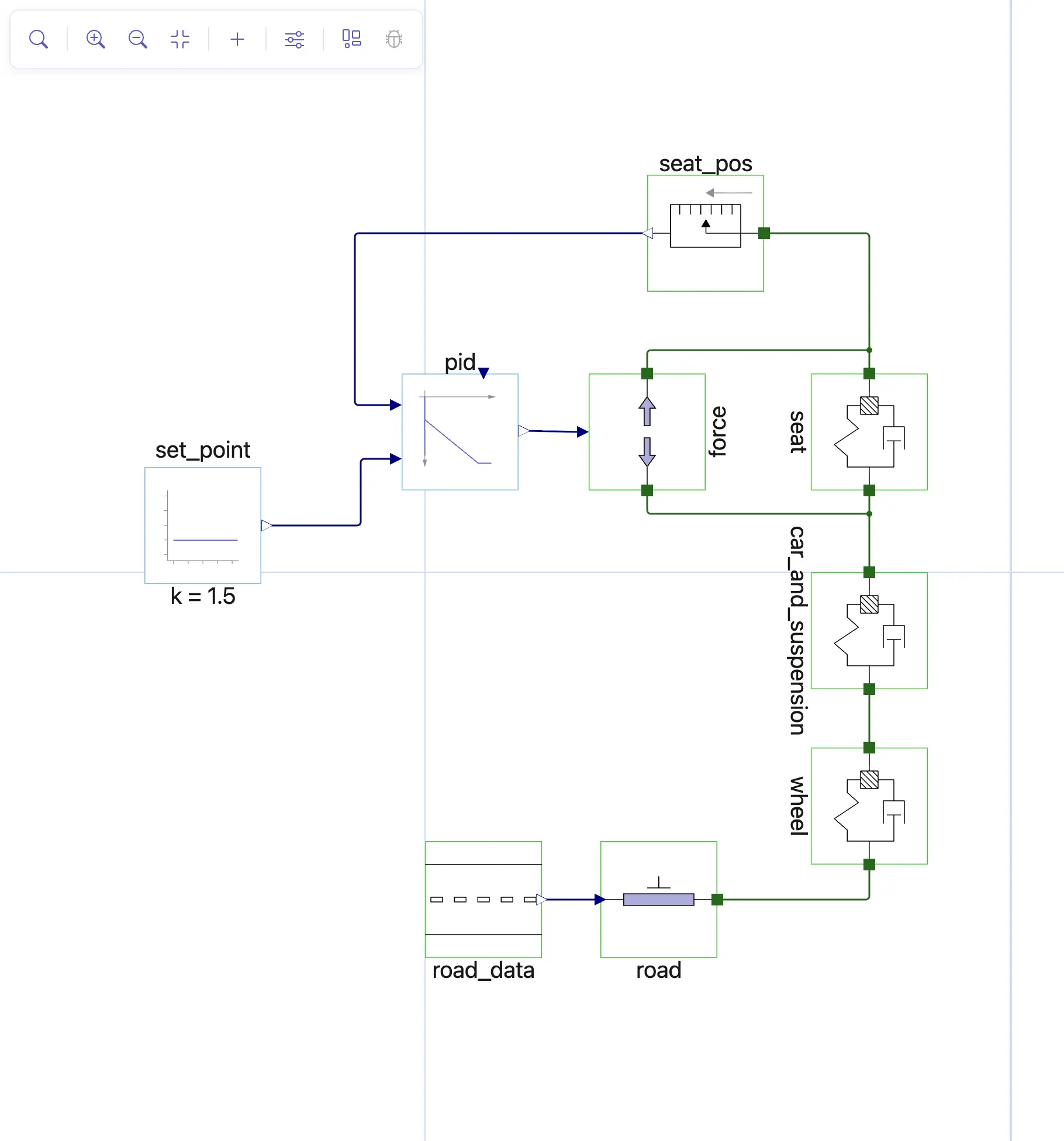
ActiveSuspension.dyad
component ActiveSuspension wheel = DyadExampleComponents.MassSpringDamper(m = wheel_mass, d = wheel_damping, c = wheel_stiffness, g = -10, theta = pi / 2) {^wheel} car_and_suspension = DyadExampleComponents.MassSpringDamper(m = car_mass, d = suspension_damping, c = suspension_stiffness, g = -10, theta = pi / 2) {^car_and_suspension} seat = DyadExampleComponents.MassSpringDamper(m = human_and_seat_mass, d = seat_damping, c = seat_stiffness, g = -10, theta = pi / 2) {^seat} road_data = DyadExampleComponents.RoadData() {^road_data} road = DyadExampleComponents.SimplePosition() {^road} force = TranslationalComponents.Force() {^force} pid = BlockComponents.LimPID(k = Kp, Ti = Ti, Td = Td) {^pid} set_point = BlockComponents.Constant(k = 1.5) {^set_point} seat_pos = TranslationalComponents.PositionSensor() {^seat_pos} parameter wheel_mass::Dyad.Mass = 25 parameter wheel_stiffness::Dyad.TranslationalSpringConstant = 1e2 parameter wheel_damping::Dyad.DampingCoefficient = 1e4 parameter car_mass::Dyad.Mass = 1000 parameter suspension_stiffness::Dyad.TranslationalSpringConstant = 1e4 parameter suspension_damping::Dyad.DampingCoefficient = 10 parameter human_and_seat_mass::Dyad.Mass = 100 parameter seat_stiffness::Dyad.TranslationalSpringConstant = 1000 parameter seat_damping::Dyad.DampingCoefficient = 1 parameter wheel_initial_position::Dyad.Position = 0.5 parameter suspension_initial_position::Dyad.Position = 1 parameter seat_initial_position::Dyad.Position = 1.5 parameter Kp::Real = 20 parameter Ti::Real = 5 parameter Td::Real = 1relations initial wheel.mass.s = wheel_initial_position initial car_and_suspension.mass.s = suspension_initial_position initial seat.mass.s = seat_initial_position initial wheel.mass.v = 0 initial car_and_suspension.mass.v = 0 initial seat.mass.v = 0 initial wheel.mass.a = 0 initial car_and_suspension.mass.a = 0 initial seat.mass.a = 0 u: analysis_point(pid.y, force.f) y: analysis_point(seat_pos.s, pid.u_m) pid.u_ff = 0 connect(wheel.flange_sd, road.flange) {^id11} connect(car_and_suspension.flange_sd, wheel.flange_m) {^id12} connect(car_and_suspension.flange_m, seat.flange_sd, force.flange_a) {^id13} connect(seat.flange_m, force.flange_b, seat_pos.flange) {^id14} connect(pid.y, force.f) {^id15} connect(pid.u_s, set_point.y) {^id16} connect(seat_pos.s, pid.u_m) {^id17} connect(road_data.y, road.s) {^id18}endcomponent ActiveSuspension wheel = DyadExampleComponents.MassSpringDamper(m = wheel_mass, d = wheel_damping, c = wheel_stiffness, g = -10, theta = pi / 2) {^wheel} car_and_suspension = DyadExampleComponents.MassSpringDamper(m = car_mass, d = suspension_damping, c = suspension_stiffness, g = -10, theta = pi / 2) {^car_and_suspension} seat = DyadExampleComponents.MassSpringDamper(m = human_and_seat_mass, d = seat_damping, c = seat_stiffness, g = -10, theta = pi / 2) {^seat} road_data = DyadExampleComponents.RoadData() {^road_data} road = DyadExampleComponents.SimplePosition() {^road} force = TranslationalComponents.Force() {^force} pid = BlockComponents.LimPID(k = Kp, Ti = Ti, Td = Td) {^pid} set_point = BlockComponents.Constant(k = 1.5) {^set_point} seat_pos = TranslationalComponents.PositionSensor() {^seat_pos} accelerationsensor = RotationalComponents.AccelerationSensor() {^accelerationsensor} parameter wheel_mass::Dyad.Mass = 25 parameter wheel_stiffness::Dyad.TranslationalSpringConstant = 1e2 parameter wheel_damping::Dyad.DampingCoefficient = 1e4 parameter car_mass::Dyad.Mass = 1000 parameter suspension_stiffness::Dyad.TranslationalSpringConstant = 1e4 parameter suspension_damping::Dyad.DampingCoefficient = 10 parameter human_and_seat_mass::Dyad.Mass = 100 parameter seat_stiffness::Dyad.TranslationalSpringConstant = 1000 parameter seat_damping::Dyad.DampingCoefficient = 1 parameter wheel_initial_position::Dyad.Position = 0.5 parameter suspension_initial_position::Dyad.Position = 1 parameter seat_initial_position::Dyad.Position = 1.5 parameter Kp::Real = 20 parameter Ti::Real = 5 parameter Td::Real = 1relations initial wheel.mass.s = wheel_initial_position initial car_and_suspension.mass.s = suspension_initial_position initial seat.mass.s = seat_initial_position initial wheel.mass.v = 0 initial car_and_suspension.mass.v = 0 initial seat.mass.v = 0 initial wheel.mass.a = 0 initial car_and_suspension.mass.a = 0 initial seat.mass.a = 0 u: analysis_point(pid.y, force.f) y: analysis_point(seat_pos.s, pid.u_m) pid.u_ff = 0 connect(wheel.flange_sd, road.flange) {^id11} connect(car_and_suspension.flange_sd, wheel.flange_m) {^id12} connect(car_and_suspension.flange_m, seat.flange_sd, force.flange_a) {^id13} connect(seat.flange_m, force.flange_b, seat_pos.flange) {^id14} connect(pid.y, force.f) {^id15} connect(pid.u_s, set_point.y) {^id16} connect(seat_pos.s, pid.u_m) {^id17} connect(road_data.y, road.s) {^id18}endActiveSuspension
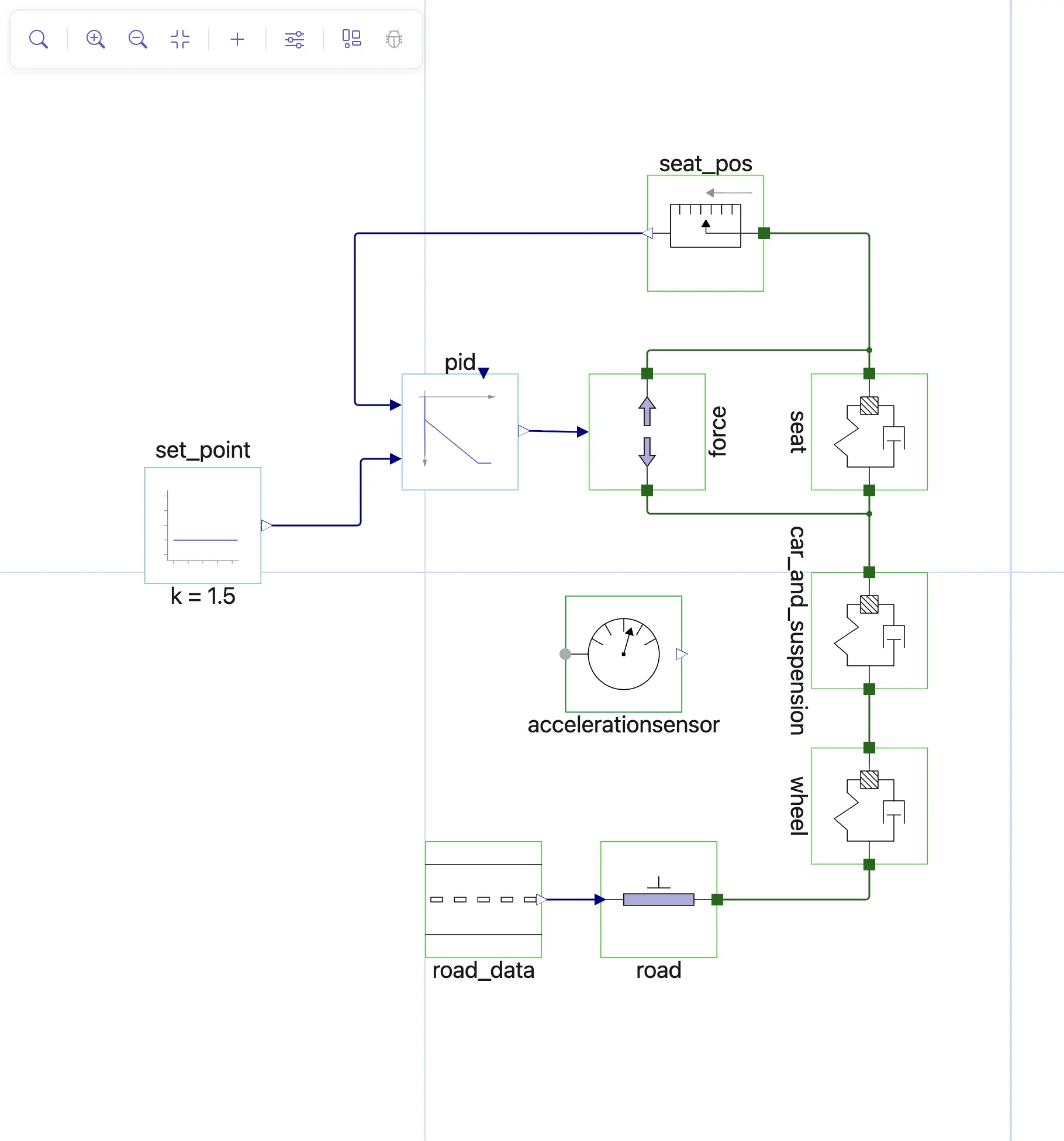
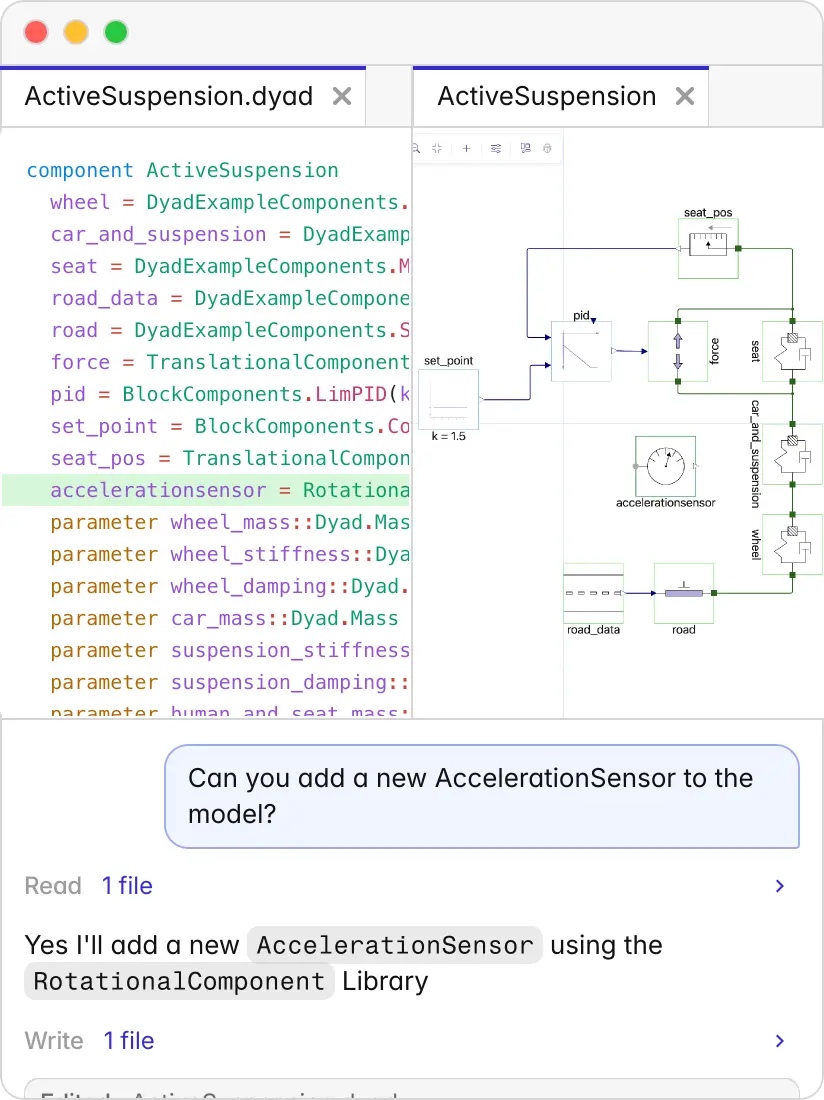
Can you add a new AccelerationSensor to the model?
Reading
Read
1 file
Yes I'll add a new AccelerationSensor using the RotationalComponent Library
Writing
Write
1 file
Editing
ActiveSuspension.dyad
Edited
ActiveSuspension.dyad
One source of truth
Agent ↔ Code ↔ GUI
Whether you're editing in VS Code, viewing in the graphical interface, or prompting the agent — you're working on the same model. Changes propagate. Nothing drifts, nothing diverges.
One source of truth
Agent ↔ Code ↔ GUI
Whether you're editing in VS Code, viewing in the graphical interface, or prompting the agent — you're working on the same model. Changes propagate. Nothing drifts, nothing diverges.
One source of truth
Agent ↔ Code ↔ GUI
Whether you're editing in VS Code, viewing in the graphical interface, or prompting the agent — you're working on the same model. Changes propagate. Nothing drifts, nothing diverges.
Serious Scientific AI under the hood
Julia + SciML, without the learning curve
Dyad Agent gives you access to state-of-the-art solvers, GPU acceleration, and the full SciML ecosystem — through natural language. No need to become a Julia expert.
Serious Scientific AI under the hood
Julia + SciML, without the learning curve
Dyad Agent gives you access to state-of-the-art solvers, GPU acceleration, and the full SciML ecosystem — through natural language. No need to become a Julia expert.
Serious Scientific AI under the hood
Julia + SciML, without the learning curve
Dyad Agent gives you access to state-of-the-art solvers, GPU acceleration, and the full SciML ecosystem — through natural language. No need to become a Julia expert.

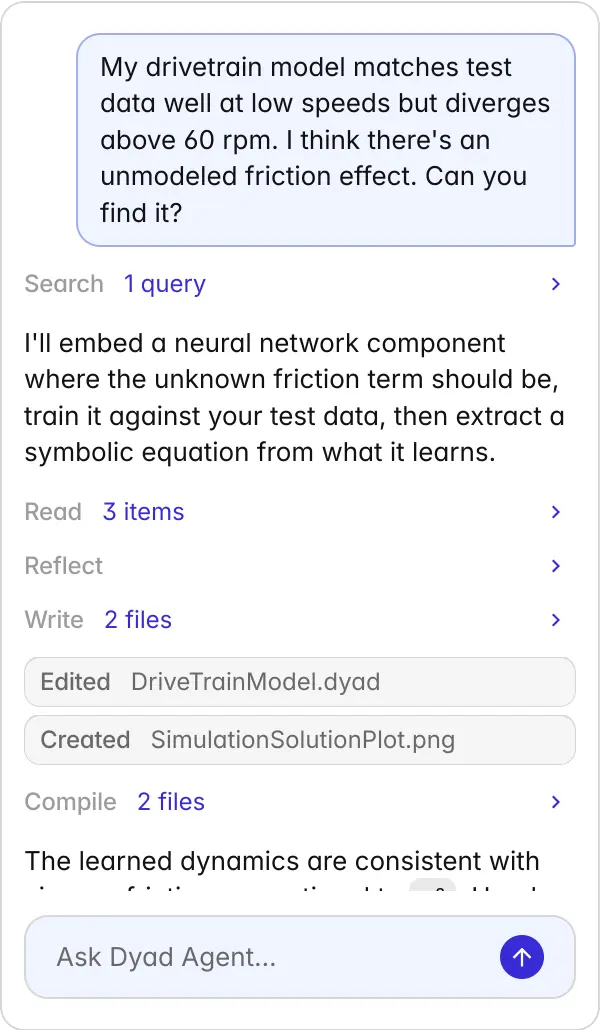
My drivetrain model matches test data well at low speeds but diverges above 60 rpm. I think there's an unmodeled friction effect. Can you find it?
Searching
Search
1 query
I'll embed a neural network component where the unknown friction term should be, train it against your test data, then extract a symbolic equation from what it learns.
Reading
Read
3 items
Reflecting
Reflect
Writing
Write
2 files
Editing
DriveTrainModel.dyad
Edited
DriveTrainModel.dyad
Editing
SimulationSolutionPlot.png
Created
SimulationSolutionPlot.png
Compiling
Compile
2 files
The learned dynamics are consistent with viscous friction proportional to ω². Here's the recovered equation: τ_friction = 0.0023 · ω². I've added this as an interpretable component. Simulation now matches test data within 1.8%.
Ask Dyad Agent…
Get Started
Start Building with Dyad
Getting Started with Dyad Studio
Download and install the IDE to start building hardware like software.
Read the Dyad Documentation
Learn the syntax, read tutorials, and dive into the analysis and component libraries.
Join the Dyad Community
Connect with fellow engineers, ask questions, and share ideas on Slack or Github.
Watch the Dyad Walkthrough Video
See a demo of using the Dyad Studio VSCode extension
Get Started
Start Building with Dyad
Getting Started with Dyad Studio
Download and install the IDE to start building hardware like software.
Read the Dyad Documentation
Learn the syntax, read tutorials, and dive into the analysis and component libraries.
Join the Dyad Community
Connect with fellow engineers, ask questions, and share ideas on Slack or Github.
Watch the Dyad Walkthrough Video
See a demo of using the Dyad Studio VSCode extension
Get Started
Start Building with Dyad
Getting Started with Dyad Studio
Download and install the IDE to start building hardware like software.
Read the Dyad Documentation
Learn the syntax, read tutorials, and dive into the analysis and component libraries.
Join the Dyad Community
Connect with fellow engineers, ask questions, and share ideas on Slack or Github.
Watch the Dyad Walkthrough Video
See a demo of using the Dyad Studio VSCode extension
Dyad Language
Write Physics, Not Solvers
Dyad is a declarative language for physical systems. You describe what your system is — the equations, constraints, and connections — and the compiler figures out how to solve it. The result: models that read like engineering, not like code.
Dyad Language
Write Physics, Not Solvers
Dyad is a declarative language for physical systems. You describe what your system is — the equations, constraints, and connections — and the compiler figures out how to solve it. The result: models that read like engineering, not like code.
component RLCCircuit resistor = Resistor(R=10) capacitor = Capacitor(C=100u) inductor = Inductor(L=10m) source = VoltageSource() ground = Ground()relations connect(source.p, resistor.p) connect(resistor.n, inductor.p) connect(inductor.n, capacitor.p) connect(capacitor.n, source.n, ground.g)endAcausal by Default
Connect components by physics, not signal flow. Add or change parts without rewiring equations.
# Neural network learns the unknown heat loss# while known physics stays intactcomponent ThermalPotUDE pot = ThermalComponents.HeatCapacitor(C=4200) heater = ThermalComponents.PrescribedHeatFlow() ambient = ThermalComponents.FixedTemperature(T=293.15) # Neural network captures missing physics nn = ThermalNeuralComponent( n_inputs=1, n_outputs=1, hidden_layers=2, neurons=10 )relations initial pot.T = 293.15 connect(heater.port, pot.port) connect(nn.port_a, pot.port) connect(nn.port_b, ambient.port)end# Train against experimental data, then extract equationsanalysis DiscoverMissingPhysics extends ModelDiscoveryAnalysis( epochs=500, symbolic_regression=true ) model = ThermalPotUDE() dataset = DyadTimeseries("dyad://data/pot_experiment.csv", independent_var="time", dependent_vars=["T"] )endScientific ML Built In
Train neural surrogates, discover missing physics, and integrate ML with first-principles models — no separate toolchain.
# Connectors define physical exchange: potential + flow# Conservation is enforced automatically at every nodeconnector Pin variable v::Voltage # potential flow variable i::Current # flow (summed to zero at connections)end# Current in = current out. Always.component Resistor p = Pin() n = Pin() variable v::Voltage variable i::Current parameter R::Resistancerelations v = p.v - n.v i = p.i p.i + n.i = 0 # enforced by the connector — energy is conserved v = i * Rend# At every connect(), Dyad sums all flows to zero# — Kirchhoff's laws in electrical, continuity in fluids,# force balance in mechanical. No manual bookkeeping.component Circuit r = Resistor(R=100) c = ElectricalComponents.Capacitor(C=1m) src = ElectricalComponents.VoltageSource() gnd = ElectricalComponents.Ground()relations connect(src.p, r.p) connect(r.n, c.p) # flow is balanced here automatically connect(c.n, gnd.g, src.n) # connect(r.n, thermal.port) ← Won't compile. # Pin ≠ Node. Type mismatch caught before simulation.endConservative by Construction
Connectors enforce energy and mass balance. Physically impossible connections fail before simulation.
# Built-in connectors for each domainconnector Pin potential v::Voltage flow i::Currentendconnector Node potential T::Temperature flow Q::HeatFlowRateend# The compiler rejects mismatched connectionsPhysically Typed Connections
Connectors enforce domain compatibility. You can't wire a thermal port to an electrical one.
# Documentation is Markdown with LaTeX# Newton's law of cooling:# $ \tau_f = c_{geo} \mu \omega_{rel} f_n $component ThermalModel # ... metadata { "Dyad": {"icon": "dyad://MyLib/assets/icon.svg"} }endModern, Open Standards
SVG for graphics. Markdown for docs. JSON for metadata. No proprietary formats to decode.
# Import Julia packages directlyusing DyadModelOptimizerusing Optimization# Run analyses from Dyadanalysis DesignOptimization extends CalibrationAnalysis( model = MySystem(), parameters = [spring.k => (100, 1000)], loss = abs2(sensor.output) )endFull Julia Ecosystem Access
Call any Julia package — SciML solvers, optimization, ML — directly from your models.
# Every model is a plain text .dyad file# No binary blobs — just diffable codecomponent Resistor extends OnePort parameter R::Resistancerelations v = i * R # Ohm's Lawend# Works with Git, CI/CD, code reviewVersion Control Native
Text-based source of truth. Diff, review, and merge models like any other codebase.
component RLCCircuit resistor = Resistor(R=10) capacitor = Capacitor(C=100u) inductor = Inductor(L=10m) source = VoltageSource() ground = Ground()relations connect(source.p, resistor.p) connect(resistor.n, inductor.p) connect(inductor.n, capacitor.p) connect(capacitor.n, source.n, ground.g)endAcausal by Default
Connect components by physics, not signal flow. Add or change parts without rewiring equations.
# Neural network learns the unknown heat loss# while known physics stays intactcomponent ThermalPotUDE pot = ThermalComponents.HeatCapacitor(C=4200) heater = ThermalComponents.PrescribedHeatFlow() ambient = ThermalComponents.FixedTemperature(T=293.15) # Neural network captures missing physics nn = ThermalNeuralComponent( n_inputs=1, n_outputs=1, hidden_layers=2, neurons=10 )relations initial pot.T = 293.15 connect(heater.port, pot.port) connect(nn.port_a, pot.port) connect(nn.port_b, ambient.port)end# Train against experimental data, then extract equationsanalysis DiscoverMissingPhysics extends ModelDiscoveryAnalysis( epochs=500, symbolic_regression=true ) model = ThermalPotUDE() dataset = DyadTimeseries("dyad://data/pot_experiment.csv", independent_var="time", dependent_vars=["T"] )endScientific ML Built In
Train neural surrogates, discover missing physics, and integrate ML with first-principles models — no separate toolchain.
# Connectors define physical exchange: potential + flow# Conservation is enforced automatically at every nodeconnector Pin variable v::Voltage # potential flow variable i::Current # flow (summed to zero at connections)end# Current in = current out. Always.component Resistor p = Pin() n = Pin() variable v::Voltage variable i::Current parameter R::Resistancerelations v = p.v - n.v i = p.i p.i + n.i = 0 # enforced by the connector — energy is conserved v = i * Rend# At every connect(), Dyad sums all flows to zero# — Kirchhoff's laws in electrical, continuity in fluids,# force balance in mechanical. No manual bookkeeping.component Circuit r = Resistor(R=100) c = ElectricalComponents.Capacitor(C=1m) src = ElectricalComponents.VoltageSource() gnd = ElectricalComponents.Ground()relations connect(src.p, r.p) connect(r.n, c.p) # flow is balanced here automatically connect(c.n, gnd.g, src.n) # connect(r.n, thermal.port) ← Won't compile. # Pin ≠ Node. Type mismatch caught before simulation.endConservative by Construction
Connectors enforce energy and mass balance. Physically impossible connections fail before simulation.
# Built-in connectors for each domainconnector Pin potential v::Voltage flow i::Currentendconnector Node potential T::Temperature flow Q::HeatFlowRateend# The compiler rejects mismatched connectionsPhysically Typed Connections
Connectors enforce domain compatibility. You can't wire a thermal port to an electrical one.
# Documentation is Markdown with LaTeX# Newton's law of cooling:# $ \tau_f = c_{geo} \mu \omega_{rel} f_n $component ThermalModel # ... metadata { "Dyad": {"icon": "dyad://MyLib/assets/icon.svg"} }endModern, Open Standards
SVG for graphics. Markdown for docs. JSON for metadata. No proprietary formats to decode.
# Import Julia packages directlyusing DyadModelOptimizerusing Optimization# Run analyses from Dyadanalysis DesignOptimization extends CalibrationAnalysis( model = MySystem(), parameters = [spring.k => (100, 1000)], loss = abs2(sensor.output) )endFull Julia Ecosystem Access
Call any Julia package — SciML solvers, optimization, ML — directly from your models.
# Every model is a plain text .dyad file# No binary blobs — just diffable codecomponent Resistor extends OnePort parameter R::Resistancerelations v = i * R # Ohm's Lawend# Works with Git, CI/CD, code reviewVersion Control Native
Text-based source of truth. Diff, review, and merge models like any other codebase.
Case Studies
See how top companies are solving complex engineering challenges
Discover how engineering teams at aerospace, automotive, and industrial companies accelerate innovation and reduce time-to-market
Case Studies
See how top companies are solving complex engineering challenges
Discover how engineering teams at aerospace, automotive, and industrial companies accelerate innovation and reduce time-to-market


Blog
The latest content on Dyad
Technical insights, customer stories, and industry developments that matter to engineering teams
Blog
The latest content on Dyad
Technical insights, customer stories, and industry developments that matter to engineering teams





Productivity
Enterprise-grade engineering capabilities
From cloud-native deployment to embedded code generation, Dyad provides the complete infrastructure modern engineering teams need to accelerate innovation
Productivity
Enterprise-grade engineering capabilities
From cloud-native deployment to embedded code generation, Dyad provides the complete infrastructure modern engineering teams need to accelerate innovation
Cloud-Native Architecture
Engineers can leverage the latest multi-GPU AI training toolchains without complex installations
Generate Embedded Code
Compile models directly to embedded C code with DO-178C and ISO 26262 compliance for safety-critical systems
Git-Based Workflows
Full Git integration with version control, diff visualization and collaborative development workflows for engineering teams
Build Digital Twins
Create digital twins that evolve with real-world data for predictive maintenance and over-the-air updates
Automate CI/CD Pipelines
Modern DevOps with automated testing, deployment, and validation workflows that integrate with your existing software engineering practices
Design Advanced Controls
Built-in control systems tools with PID autotuning, linearization, and deployment to embedded targets
Cloud-Native Architecture
Engineers can leverage the latest multi-GPU AI training toolchains without complex installations
Generate Embedded Code
Compile models directly to embedded C code with DO-178C and ISO 26262 compliance for safety-critical systems
Git-Based Workflows
Full Git integration with version control, diff visualization and collaborative development workflows for engineering teams
Build Digital Twins
Create digital twins that evolve with real-world data for predictive maintenance and over-the-air updates
Automate CI/CD Pipelines
Modern DevOps with automated testing, deployment, and validation workflows that integrate with your existing software engineering practices
Design Advanced Controls
Built-in control systems tools with PID autotuning, linearization, and deployment to embedded targets
Cloud-Native Architecture
Engineers can leverage the latest multi-GPU AI training toolchains without complex installations
Generate Embedded Code
Compile models directly to embedded C code with DO-178C and ISO 26262 compliance for safety-critical systems
Git-Based Workflows
Full Git integration with version control, diff visualization and collaborative development workflows for engineering teams
Build Digital Twins
Create digital twins that evolve with real-world data for predictive maintenance and over-the-air updates
Automate CI/CD Pipelines
Modern DevOps with automated testing, deployment, and validation workflows that integrate with your existing software engineering practices
Design Advanced Controls
Built-in control systems tools with PID autotuning, linearization, and deployment to embedded targets
Frequently Asked Questions
Answers to common questions about Dyad
Frequently Asked Questions
Answers to common questions about Dyad
What is Dyad?
Dyad is an AI agent for physics-based modeling and simulation. It lets engineers describe what they're modeling in natural language, and the Dyad Agent researches formulations, derives equations, assembles components, runs simulations, and validates the physics.
How do I get started with Dyad?
Download and install Dyad Studio (a VS Code-based IDE), read the Dyad documentation for syntax, tutorials, and libraries, and join the Dyad community on Slack or GitHub. Installation instructions and docs are available at help.juliahub.com/dyad.
How does Dyad ensure models are physically correct?
Every model produced by Dyad passes through a compiler that enforces unit consistency, type-safe physical connections, and conservation laws (such as energy and mass balance). Physically impossible connections and unit mismatches are caught before simulation rather than surfacing later.
Can Dyad models be deployed to safety-critical or embedded systems?
Yes. Dyad can compile models directly to embedded C code with DO-178C and ISO 26262 compliance for safety-critical systems, in addition to supporting digital twins, CI/CD automation, and advanced controls design.
What underlying technology powers Dyad?
Dyad Agent is built on Julia and the SciML ecosystem, giving users access to state-of-the-art solvers, GPU acceleration, and the full Julia package ecosystem through natural language, without needing to become a Julia expert.
Can Dyad integrate machine learning with physics-based models?
Yes. Dyad has scientific machine learning built in, allowing engineers to embed neural network components to capture unknown physics, train them against experimental data, and extract interpretable symbolic equations using model discovery and symbolic regression.
What modeling techniques does Dyad support?
Dyad supports causal (block-diagram), acausal (equation-based), and synchronous state-machine modeling techniques together in a single system, rather than forcing engineers to choose one approach.
Is Dyad's model source code readable and version-controlled?
Yes. Every Dyad model is a plain-text .dyad file with no binary blobs, so models can be diffed, reviewed, and merged with Git and standard CI/CD workflows like any other codebase.
Contact Sales
Learn about Dyad, pricing, implementation, and how we can help your business
We’ll use your information to respond to your inquiry and, if applicable, classify your interest for relevant follow-up regarding our products. If you'd like to receive our newsletter and product updates, please check the box above. You can unsubscribe at any time. Learn more in our Privacy Policy.
Get a Demo
Discover how Dyad and JuliaHub can improve your modeling and simulation workflows.
Enterprise Support
Leverage our developers, engineers and data scientists to help you build new solutions.
Custom Solutions
Have a complex setup that needs a custom solution? We are here to help.
Contact Sales
Learn about Dyad, pricing, implementation, and how we can help your business
We’ll use your information to respond to your inquiry and, if applicable, classify your interest for relevant follow-up regarding our products. If you'd like to receive our newsletter and product updates, please check the box above. You can unsubscribe at any time. Learn more in our Privacy Policy.
Get a Demo
Discover how Dyad and JuliaHub can improve your modeling and simulation workflows.
Enterprise Support
Leverage our developers, engineers and data scientists to help you build new solutions.
Custom Solutions
Have a complex setup that needs a custom solution? We are here to help.
Contact Sales
Learn about Dyad, pricing, implementation, and how we can help your business
We’ll use your information to respond to your inquiry and, if applicable, classify your interest for relevant follow-up regarding our products. If you'd like to receive our newsletter and product updates, please check the box above. You can unsubscribe at any time. Learn more in our Privacy Policy.
Get a Demo
Discover how Dyad and JuliaHub can improve your modeling and simulation workflows.
Enterprise Support
Leverage our developers, engineers and data scientists to help you build new solutions.
Custom Solutions
Have a complex setup that needs a custom solution? We are here to help.