Introduction: A Unified Vision for Systems Engineering
The release of Dyad 2.2 marks a fundamental shift in how engineers interact with complex simulation environments. This update represents a complete overhaul of the workspace architecture, the integration of next-generation AI models, and a transition to the latest mathematical foundations in the Julia ecosystem.
Version 2.2 introduces a series of practical refinements designed to improve agent stability, provide clearer visibility into system architectures, and ensure more consistent project migrations.
In This Update (TL;DR)
The Dyad Primary Sidebar: New centralized hub for managing components, analyses and notebooks
Custom Julia Distribution: Streamlined installation and significantly reduced time to first analysis
Agent Transparency: AI now clearly and concisely summarizes what it’s doing; click to dig deeper
Compiler and Solver Enhancements: Full compatibility with ModelingToolkit (MTK) v11, introducing advanced solver controls and restored analysis features
Version Upgrade Support: Seamlessly migrate projects to newer versions of Dyad
The Unified Dyad Sidebar
The Challenge: Previously, relevant views—like component and analysis lists and file views with notebooks and other files—were scattered across the IDE in multiple panes and locations, which was confusing and difficult to navigate.
Our Solution: We have introduced the Dyad Primary Sidebar. This is the new "mission control" for your projects. It collects everything you need in one place:
Dyad Components: A tree-view where you easily find all your libraries and components in one place.
Analysis and execution: Quick access to transient, steady-state and other analyses directly from the tree view and the component tab.
AI Agent: The Dyad AI Agent is always at your fingertips taking on any modelling challenge you need help with.
Global Shortcuts: One-click access to chat with the agent, launch a REPL, import libraries, or open documentation.
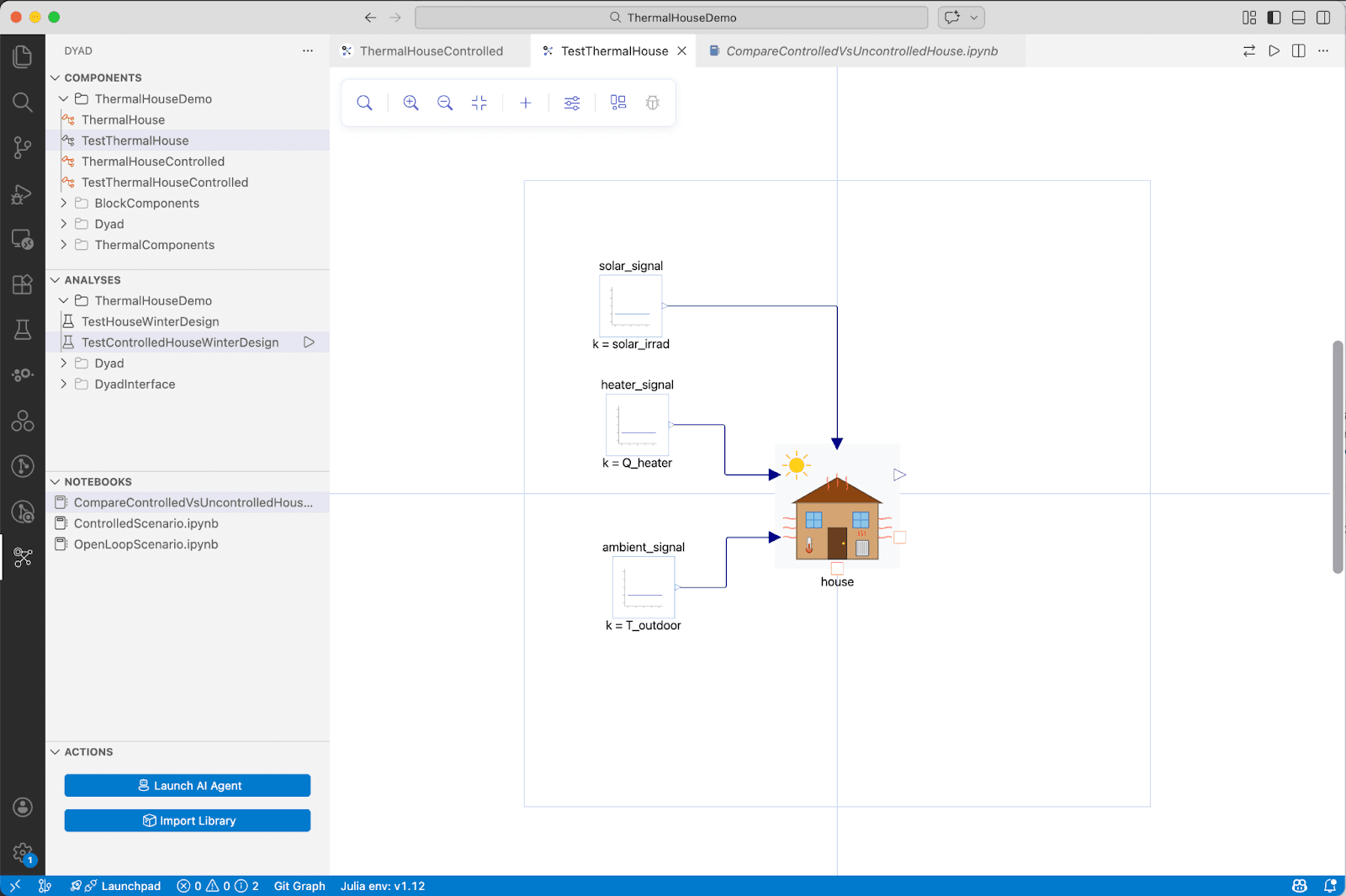
Why It Matters: By centralizing these views into one place, we’ve reduced the mental overhead of navigating projects. Whether you are authoring a component or running an analysis, your tools are always right there in the sidebar.
Custom Julia Distribution
The Challenge: In previous versions, installation and the initial run of an analysis required the system to compile core libraries from source. This led to a "first-run" lag that could take several minutes, which is not an ideal experience, especially for first-time users.
The Update: We now deliver a custom Julia distribution with the core Dyad library suite built into the Julia “system image”. By utilizing pre-built binaries and cached artifacts, we have eliminated the need for building these components on your local machine.
Why It Matters: This update brings Dyad's installation, startup and analysis times in line with standard engineering expectations. While we are continuing to optimize both startup time and execution speed, users who have worked with earlier versions of Dyad will notice a significant improvement in how quickly they can move from opening a model to seeing simulation results.
Agent Visibility and Stability
The Challenge: It was previously difficult to tell what the agent was doing during complex tasks, and "stale" states in the language server could occasionally cause the agent to get stuck in loops.
Our Solution: We have focused on making the agent's actions more transparent and its connection more stable:
Tool Call Summaries: When the agent uses a tool, it now generates a brief summary of that action. Visual status indicators also show exactly when a tool is currently executing, so you aren't left guessing during long operations.
Language Server Debugging: We’ve given the agent more capability in its compile tool to allow it to aid the user in debugging, such as the ability to restart the language server.
Simplified Authentication: We’ve updated how the system handles security tokens. By requesting fresh tokens for each request, we’ve made the authentication process much smoother for long-running sessions.
Model Updates: Claude Opus 4.6 is now the default model, with Sonnet and Haiku also available as standard options.
Why It Matters: These changes make the agent more understandable and predictable. You can now see its "thought process" at a glance and spend less time dealing with session timeouts or stale code information.
Compiler and Solver Enhancements
While much of our recent work involved the transition to ModelingToolkit (MTK) v11, we have used this milestone to introduce several core compiler features and solver improvements:
Advanced Solver Selection: You can now explicitly select specific solvers (e.g.,
Rodas5P,FBDF,Tsit5) directly via the newODEAlgenum in your analysis specifications.Restored Functionality: This update restores
analysis_pointsfor standard components (such asActiveSuspension) that were affected during the initial transition to the new codegen.
Why It Matters: These enhancements ensure that your models are not only faster but also more robust against the complexities of modern systems engineering. This transition eliminates technical debt and provides a clear, stable path forward for the platform.
Productivity & UX Polish
We’ve focused on the small details that make a big difference in daily productivity:
Project Migration: Upgrading to 2.2 is now an automatic and guided process. This ensures seamless migration of your settings and project files to the new version.
UI Refinements: We’ve improved tooltips in the component tree and the diagram and provided a dedicated inline icon for array parameter editing for easy access.
UX Improvements. We’ve improved the user interaction in the different views in the Dyad Sidebar for a more coherent and informed experience. The user is always aware about library loading, editor tab behavior is more intuitive and common features such as layer switching and creating/running analyses are easily accessible.
Looking Ahead
Dyad 2.2 provides a more stable and organized foundation for your systems engineering work. We are now shifting our focus toward our next release cycle, which will continue to refine the Studio experience and expand our core modeling capabilities. Stay tuned for more updates as we continue to build out the future of autonomous design.
Get Involved!
Launch Dyad Studio to experience all these new features today!
Read our documentation to learn more about how to use these tools.
Join the discussion on our communities and let us know what you think.
Happy modeling!