Traditional model-based engineering tools were built for a different era. Today, the real marker of product success isn't legacy dominance. It’s how seamlessly your environment anticipates your needs. Dyad is leading a new frontier in model-based engineering, replacing outdated paradigms with intelligent, agentic capabilities. With Dyad 3.3, we’re taking another leap forward: combining a more context-aware AI agent, frictionless modeling workflows, and full 3D multibody support to deliver a faster, smarter simulation environment.
In This Update (TL;DR)
MultibodyComponents grows from planar into full 3D mechanics — bodies, joints, cables, wheels, trajectory planning, URDF import — and reaches functionally complete coverage of Modelica's MultiBody library.
Boolean parameters get a proper checkbox editor instead of a raw expression field.
Initial and guess values are editable directly from the diagram panel.
Enum-valued parameters accept short, bare case names.
The Dyad Agent's library reference and compile checks now always match what's on disk.
New Physical Domain: MultibodyComponents Goes 3D
MultibodyComponents has covered 2D planar mechanics since Dyad 3.0. In 3.3, it grows into full 3D mechanics: bodies with customizable shapes (like boxes or cylinders), joints and kinematic constraints (revolute, prismatic, spherical, universal, and combined types), cables, wheel dynamics using Pacejka tire models, trajectory planning, URDF import, and 3D rendering and animation. Planar mechanics stay available for models that don't need the third dimension.
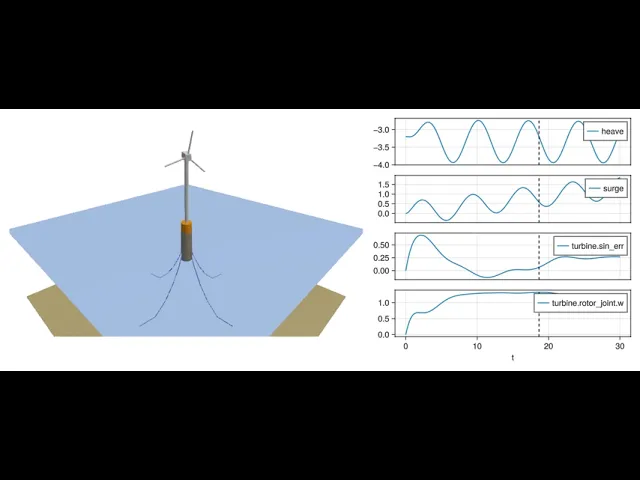
Floating wind turbine. The platform sits on the ocean surface, held to the seabed by four mooring lines built from the multibody cable model — cables and platform both pick up drag and buoyancy as they move through the water. A simple proportional controller keeps the turbine's rotation steady while the wind direction shifts.
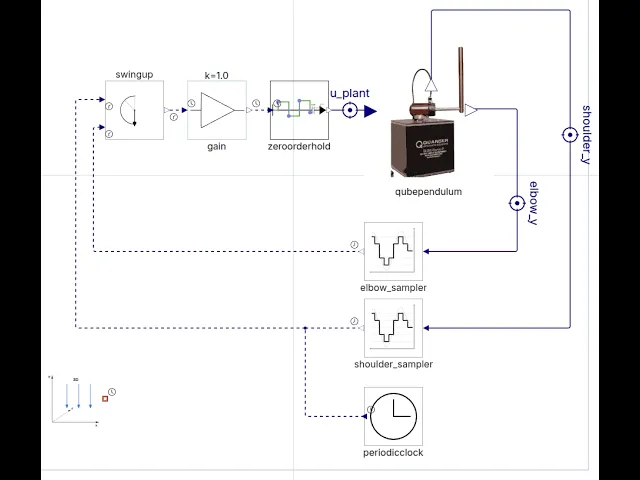
Quanser QUBE-Servo rotary pendulum. This Furuta-pendulum benchmark, familiar from classic control-systems coursework, is modeled as a fixed base with a revolute shoulder joint, an upper arm, an elbow joint, a lower arm, and a simple motor. Its discrete-time controller switches between two sub-controllers: an energy-based swing-up controller and an LQR stabilizer. Simulating it, the pendulum swings up from rest and balances — and a companion video walks through the Julia code Dyad generates for the model.

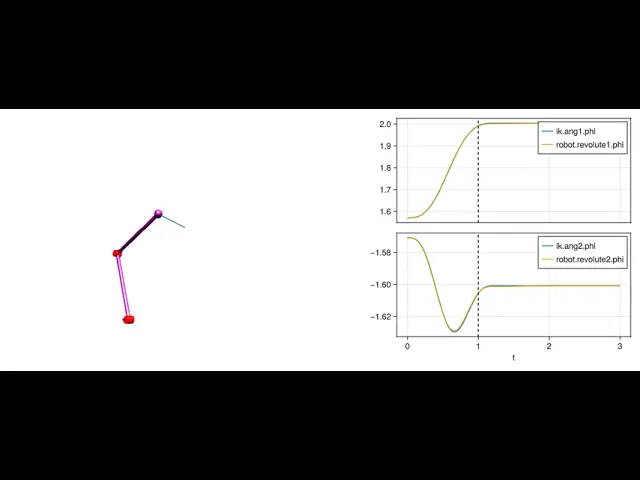
Two-joint robot arm. Using an inverse model to generate actuation feedforward signals and inverse kinematics automatically, a trajectory planner generates time-optimal, jerk/acceleration/velocity-bounded paths for the arm. The arm is ultimately feedback-controlled by two PID controllers tracking the optimal trajectory.
We're also prototyping integration with the Omniverse platform to run coupled simulations, as well as fast, physically accurate rendering for physical AI. Stay tuned for more developments there.
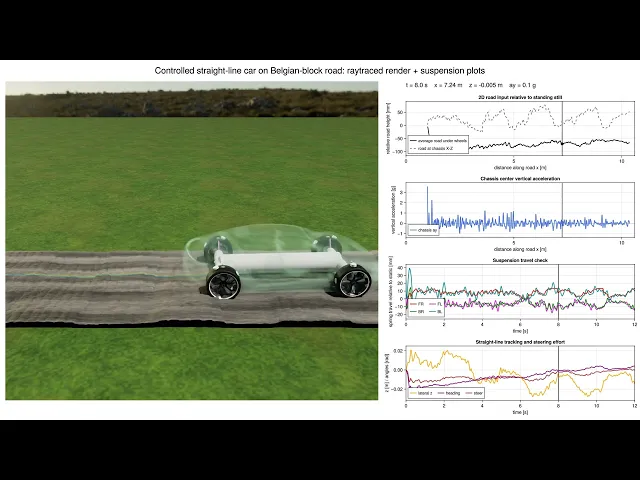
Dyad vs. Modelica: MultibodyComponents now reaches functionally complete coverage of the Modelica Standard Library's Modelica.Mechanics.MultiBody package: every joint type, every analytic loop-closing assembly, and every sensor has a Dyad equivalent.
There's always more to do, but at Dyad's pace of development and monthly release cadence, this is an area customers can expect rapid advancement in — from full Modelica coverage now to physically accurate friction modeling for RotationalComponents and TranslationalComponents next.
Studio: Faster Everyday Editing
Dyad Studio continues to focus on usability — small refinements that compound into a more productive day-to-day modeling experience.
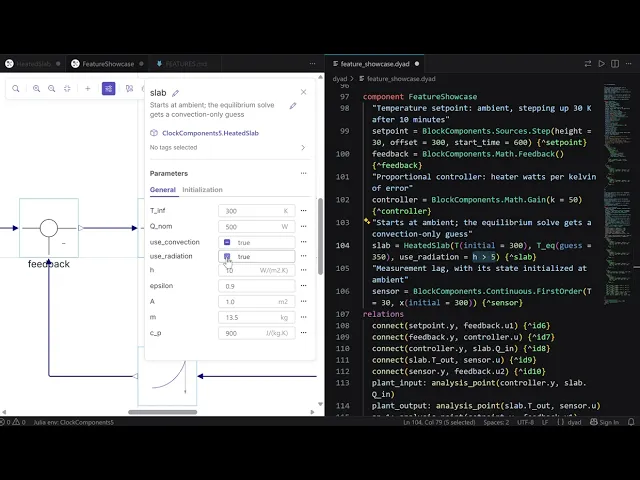
Boolean parameters, properly editable. Boolean parameters previously took a raw expression field, so setting a literal true or false meant typing it out like any other value. They now get a checkbox for the literal cases, with the same expression field available underneath for anything symbolic — a parameter reference, a computed condition, and so on.
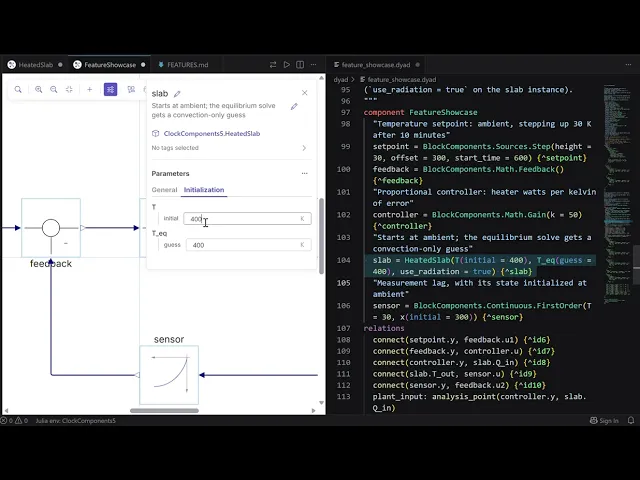
Initial and guess values on the diagram. Initial and guess values can now be set directly from the diagram view's parameter panel, without a trip into the underlying .dyad source. Hovering a variable's initialization label shows its full name, so it's clear which variable you're setting before you commit a value.
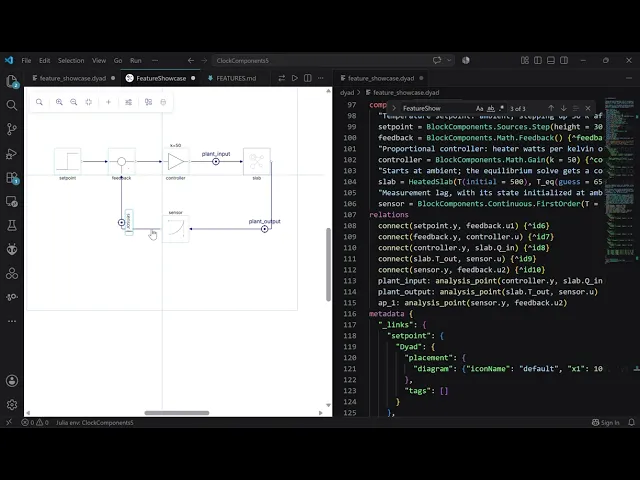
Analysis points, ready to name. Creating an analysis point now opens its name for editing immediately, rather than requiring a second click to rename it. Small on its own, but it adds up on a model with a dozen analysis points.
Dyad Language: Short-Form Enum Parameters
Enum-valued parameters previously required the fully-qualified path to the case, even when the enum's type was already unambiguous from context:
An existing binding in scope always shadows an enum case, so nothing that compiled before changes meaning. A prefix that doesn't resolve is now a compile-time diagnostic.
Component Library Updates
BlockComponents adds a PID continuous block, three new nonlinear blocks (DeadZone, VariableLimiter, PadeDelay), and five new signal-source blocks (LogFrequencySweep, BooleanConstant, BooleanStep, IntegerConstant, IntegerStep).
Advancing the Dyad Agent
The agent's library reference now knows what's actually installed in your project: add a package and its documentation appears within seconds. Hand-written usage guides that ship with a library — for example, MultibodyComponents' tutorials on pendulums, kinematic loops, and trajectory planning — are also included in the reference.
The agent's compile check now always runs against your saved files on disk. Previously it could check against a stale in-memory snapshot, missing edits or libraries added mid-session. If the check itself can't run, the agent now says so instead of going silent.
Models with large context windows are used by default, so long sessions run further before compaction.
Language and Kernel Refinements
Library load times, which had regressed since Dyad 2.2.0, are back to expected levels.
Parameter overrides applied to variables inherited through extends are now correctly applied.
Setting a sub-component variable's guess through a modifier no longer crashes the compiler.
Clock rates no longer leak between instantiations of a component whose dt isn't a literal.
Installing and Upgrading
New to Dyad? On Windows, a single installer sets up everything in one step; on macOS and Linux, the Dyad Studio extension installs from the VS Code Marketplace. The installation page has the full setup.
Already on 3.2? Opening a project in 3.3 triggers a one-click migration that pins the new library versions — no source-level changes required. One thing to check first: RotationalComponents and TranslationalComponents are settling on the term Velocity instead of Speed, renaming a handful of MSL-style components introduced recently:
Library | Deprecated | Use instead |
|---|---|---|
RotationalComponents | ConstantSpeed | ConstantVelocity |
RotationalComponents | SpeedSource | VelocitySource |
TranslationalComponents | RelativeSpeedSensor | RelativeVelocitySensor |
TranslationalComponents | SpeedSensor | VelocitySensor |
TranslationalComponents | Accelerate | AccelerationSource |
TranslationalComponents | ConstantSpeed | ConstantVelocity |
TranslationalComponents | Speed | VelocitySource |
Dyad 3.3 continues the push toward AI-native systems engineering, with deeper physical-modeling coverage, a tighter Studio experience, and an agent that understands your project better with every release. We're also investing in a richer development environment around Dyad. Stay tuned as we keep expanding what Dyad can do.
Happy modeling!